
Orientation manual for new ScanHub users covering login, navigation, and the core features of the platform.
V1.0
SCANHUB ORIENTATION MANUAL
WELCOME TO SCANHUB
Welcome to ScanHub , the all-in-one educational and professional development platform for ultrasound imaging and medical diagnostics. This manual provides a comprehensive guide to the platform’s features, helping you optimize your learning and professional growth.
ScanHub supports healthcare professionals throughout their ultrasound education, from initial training to advanced fellowship programs. It offers a complete learning ecosystem by integrating cutting-edge AI technology with traditional educational methods.
PLATFORM OVERVIEW
The ScanHub platform integrates various modules, each developed to cater to specific educational and professional requirements. The subsequent sections will detail each feature and guide you on its effective use.
DASHBOARD
Purpose The ScanHub platform’s Dashboard is your central hub for a complete overview. It offers a concise summary of your activities, progress, and key notifications.
Instructions The ScanHub platform’s Dashboard is your central hub for a complete overview. It offers a concise summary of your activities, progress, and key notifications.
Access your primary metrics and quick statistics View recent activity summaries Navigate to other sections using the overview cards Check system notifications and announcements Monitor your overall progress across all modules

MY COURSES
Purpose The "My Courses" area is where you can find and organize your educational materials, helping you take control of your learning.
Instructions Browse available courses and training materials Track your course completion progress Access course materials, videos, and resources Submit assignments and view grades Download certificates upon completion Set learning goals and deadlines

SCAN VAULT
Purpose The Scan Vault provides a secure, efficient platform for organizing, storing, and managing your medical scans and imaging data.
Instructions Upload new medical scans and images Organize scans by patient, date, or case type Apply tags and metadata for easy searching Share scans securely with mentors or colleagues Download scans in various formats Maintain version control for edited images

SCANS
Purpose The Scans section serves as your active workspace for detailed scan analysis and review. This is where you perform your diagnostic work and collaborate with colleagues.
Instructions Open scans for detailed analysis Use measurement and annotation tools Compare multiple scans side-by-side Generate reports and findings Collaborate with team members on interpretations Save work in progress for later review

PATHOLOGY GALLERY
Purpose The Pathology Gallery offers a valuable educational resource: a curated collection of pathological cases and reference materials. It serves as an excellent tool for studying both rare and common conditions.
Instructions Browse curated pathology cases Study rare and common conditions Access high-resolution pathology images Read case descriptions and diagnostic information Bookmark cases for future reference Contribute your own cases (if authorized)

FELLOWSHIP
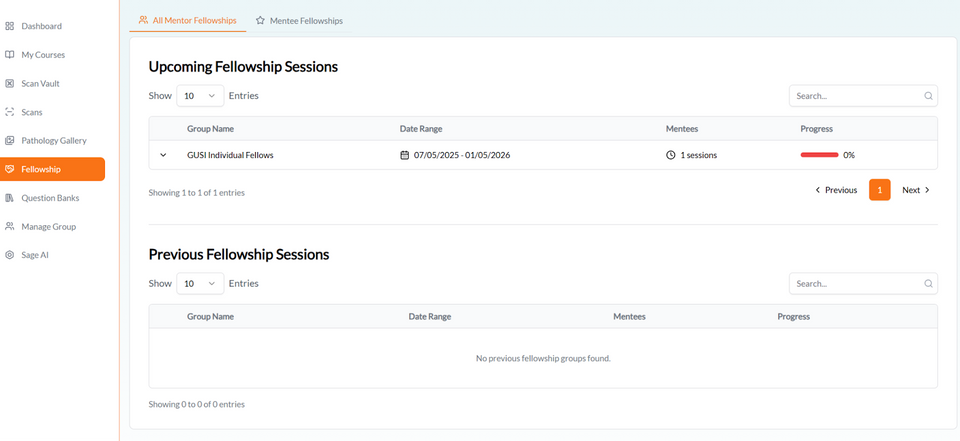
Purpose The Fellowship module helps you manage fellowship programs and maintain productive mentoring relationships. This section supports both mentors and mentees in achieving program objectives.
Instructions View upcoming fellowship sessions Join scheduled mentoring sessions Access previous session recordings and notes Track progress through fellowship milestones Communicate with mentors and fellow participants Submit fellowship requirements and documentation
QUESTION BANKS
Purpose The Question Banks feature provides comprehensive practice tests and assessment materials to help you prepare for certifications and enhance your knowledge.
Instructions Access practice questions by specialty or topic Take timed practice exams Review detailed explanations for answers Track your performance over time Identify weak areas for focused study Create custom question sets for targeted practice

MANAGE GROUP
Purpose Group leaders can access administrative tools within the Manage Group section. This feature is exclusive to users with the necessary permissions.
Instructions Create and configure fellowship groups Add or remove group members Schedule group sessions and meetings Assign mentors to mentees Monitor group progress and participation Generate group performance reports Manage group resources and materials

SAGE AI
Purpose Sage AI, a sophisticated artificial intelligence technology, is seamlessly integrated into the ScanHub platform. This powerful tool enhances diagnostic accuracy and optimizes the learning experience through its AI-powered assistance and analysis capabilities.
Instructions Upload images for AI-assisted analysis Get preliminary diagnostic suggestions Use AI for measurement and quantification Access AI-powered learning recommendations Compare AI findings with your own assessments Provide feedback to improve AI accuracy Important Note: AI suggestions are meant to assist and support clinical decision-making, not replace professional judgment. Always verify AI findings with your clinical expertise and established protocols.

SETTINGS
Purpose The Settings section offers a personalized ScanHub experience, allowing you to manage account preferences and customize your interface.
Instructions Update your personal profile information Change password and security settings Configure notification preferences Set timezone and language options Manage privacy and sharing permissions Customize interface preferences Update professional credentials and certifications
SETTINGS
Purpose To safeguard your account information, always use the Logout function to exit the platform securely.
Instructions Always use the logout button to properly end your session Ensure all work is saved before logging out Clear browser cache if using a shared computer Verify logout completion before closing the browser
GENERAL NAVIGATION TIPS
To optimize your ScanHub experience, consider these general tips for navigation and usage:
Use the search functionality to quickly find specific content across the platform Bookmark frequently used sections for quick access Check for platform updates and new features regularly through the Dashboard Contact support through the help section if you need assistance Ensure a stable internet connection for optimal performance
BEST PRACTICES
For Learners Set regular study schedules and use the My Courses section to track your progress Actively engage with the Pathology Gallery to build your diagnostic knowledge base Practice regularly using the Question Banks to reinforce learning Organize your scans systematically in the Scan Vault for easy retrieval Utilize Sage AI as a learning tool, comparing AI suggestions with your own assessments For Mentors and Group Leaders Regularly update group schedules and communicate with participants through the Fellowship module Monitor mentee progress using the Manage Group section Share relevant cases from the Pathology Gallery to enhance group learning Provide timely feedback on submitted work and assessments Document session notes and make recordings available for review
SUPPORT AND RESOURCES
Should you encounter any difficulties or have inquiries regarding ScanHub, various support resources are at your disposal:
Technical Support Should you encounter any technical issues or platform bugs, please reach out to the technical support team via: support@gusipocus.com Educational Support Should you have any inquiries regarding courses, content, or educational programs, please contact your program coordinator: fellowships@gusipocus.com
GETTING STARTED CHECKLIST
Use this checklist to ensure you have completed all essential setup steps:
Complete your profile in the Settings section Set notification preferences to stay informed Configure your timezone and language settings Explore the Dashboard to familiarize yourself with the interface Browse available courses in the My Courses section Review the Pathology Gallery to understand available resources Test the Scan Vault by uploading a sample image Connect with your mentor or group leader if enrolled in a fellowship Bookmark this manual for future reference Review the Support Resources for additional assistance
WELCOME TO SCANHUB!
We are committed to supporting your educational journey and professional development in ultrasound imaging.